project
vibecut recodes itself
An AI-scriptable fork of Kdenlive that edits video from natural language, chat-driven noise removal and subtitle generation included, live on the timeline.
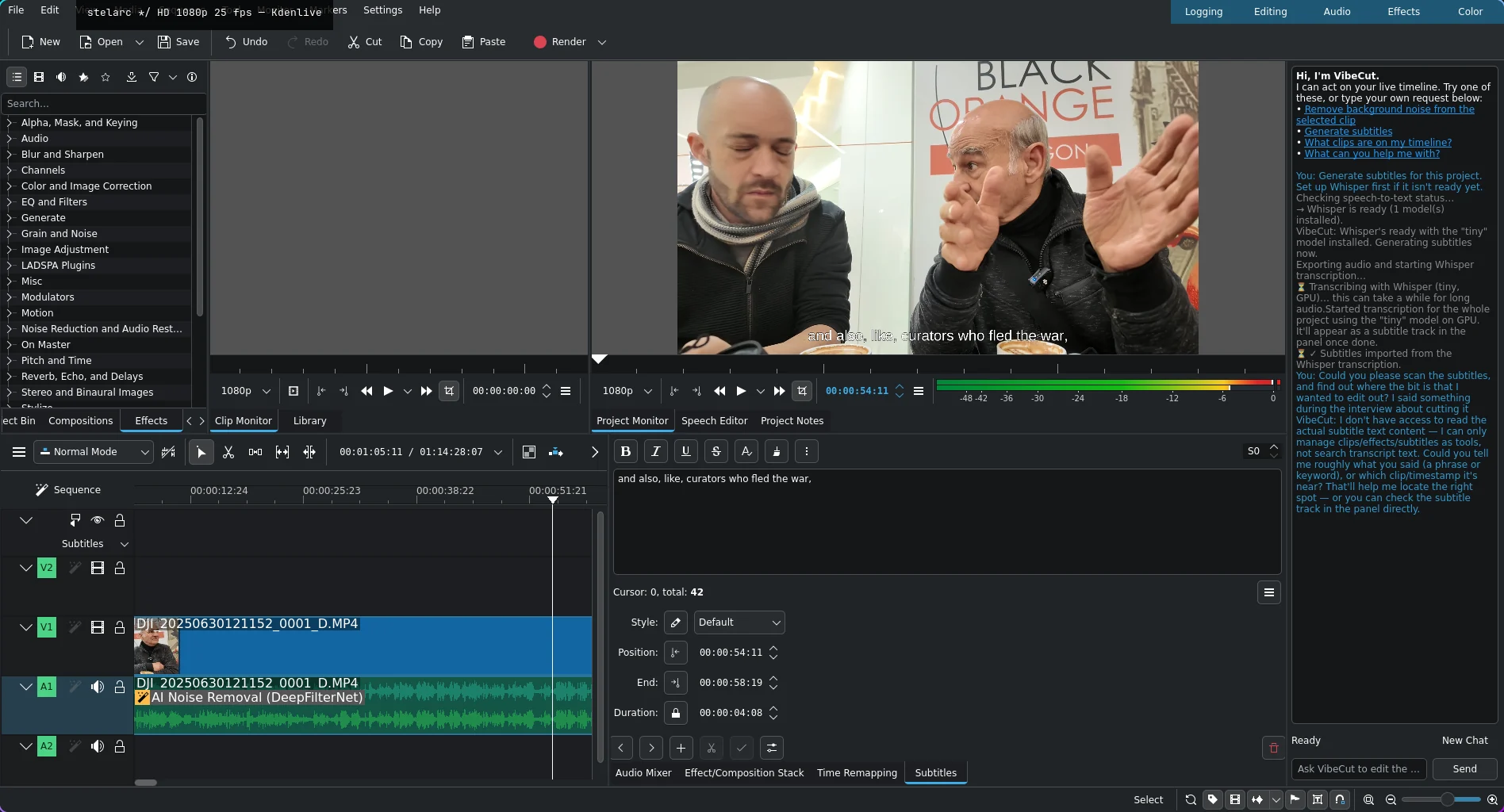
@10_X_eng built vibecad, an AI-native fork of FreeCAD, and asked who'd do the video-editing equivalent. vibecut is the answer: a fork of Kdenlive with a chat panel wired directly into the editor, so it can drive and extend the app live from natural language instead of only triggering pre-built menu features.
The screenshot above is a real run, not a mockup: chat-driven AI noise removal (DeepFilterNet via RNNoise) and a full-project GPU-Whisper subtitle transcription, both landed on the timeline by asking for them.
Two modes, on purpose
vibecut splits authoring into two tiers rather than one big scripting blob, mirroring vibecad's own architecture:
- Native mode — the model calls a curated set of existing Kdenlive/MLT operations (apply an effect, insert a clip, trim), each validated against the live project before it executes. No arbitrary code runs. "Remove the background noise from this clip" lives here.
- VibeScript mode — the model writes and runs actual code in an isolated worker, and only validated output lands on the real project. This is the part that makes it a fork that recodes itself: genuine live extension, via an embedded
QJSEnginerather than bolting on Python bindings Kdenlive never needed. Saved scripts double as the addon system Kdenlive doesn't otherwise have — there's no real third-party plugin API in the upstream project today.
Both tiers deliberately give the model a small, frozen authoring surface — current selection, stable IDs, the tools it needs — instead of dumping the whole project state into every turn.
What "build in public" means here
The commit log is full of dead ends chased to ground, not just features landing, and that's the point of writing this up at all. Two from the same week:
Chat-driven Whisper subtitles kept failing the same way — speech_setup reported {"started": true} every time, but no venv, no cache, no python process ever actually appeared. Tracing it through Kdenlive's own source (not guessing) turned up the real bug: the install call vibecut used unconditionally can't create a venv from scratch in the first place; that path only works once a venv already exists. Kdenlive's own Install button never hits that call directly — it switches on install status first. vibecut's tool now makes the same switch. Three more real failures after that fix (two segfaults, a pip run that silently installed nothing) led to a bigger call: stop debugging a subsystem after its actual bug is already found and fixed, and instead give vibecut its own small, owned process for just that piece, reusing only the static parts of Kdenlive's implementation.
A later run of that rebuilt subtitle pipeline looked stuck — "still going?" after several minutes. It wasn't hung, it was on CPU: a setting that looked like the right device flag defaults to the literal string "cpu" in Kdenlive's own config schema, and nothing in vibecut's flow exposes a way to change it. Every transcription had quietly been running on CPU against a fully verified, working CUDA install. Fixed by ignoring that setting for this call and asking the venv's own torch.cuda.is_available() instead.
Neither bug was where it first looked. Both got found by reading the real code and the real process state rather than trusting a plausible-sounding prior assumption — which is turning into the actual throughline of this project so far.
Where it stands
The fork builds, installs, and runs. The chat panel is wired end to end for Native mode: list clips, read the current selection, apply an allowlisted effect, ask the user a clarifying question. VibeScript — the part that lets it write and run new capabilities, not just call existing ones — is next.
Source: github.com/0xmeowmeow/vibecut (branch vibecut, forked from kde/kdenlive).